The 21-Control Scan Lied By Omission
In Part 1, Pawsman.com's cluster scored 83.8% on the baseline-dev policy. That looked reasonable — until you realize that baseline-dev covers only reliability and operational controls. It doesn't check authentication, encryption, or authorization at all.
The real question: can anyone on Pawsman's internal network read payment data from the Kafka cluster?
The answer, as we're about to show, is yes.
Switching to finance-iso — All 55 Controls
The finance-iso policy is designed for regulated industries: payments, healthcare, financial services. It covers all 55 KafkaGuard controls across three categories:
| Category | Controls | What it checks |
|---|---|---|
| Security | 30 | SASL, TLS, ACLs, encryption at rest, audit logging, inter-broker auth |
| Reliability | 17 | Replication, ISR, KRaft quorum health, Confluent version consistency |
| Operational | 8 | Topic management, retention, threading, GC logging |
Run the full audit with all four report formats:
kafkaguard scan \
  --bootstrap pawsman-kafka-01:9092 \
  --policy policies/finance-iso.yaml \
  --format json,html,pdf,csv \
  --out ./pawsman-compliance-may2026
Output — 107ms, 55 controls evaluated:
KafkaGuard v2.3.0
Scan tier: community
🔍 Auto-detecting security protocol from broker metadata...
✅ Auto-detected security protocol: PLAINTEXT
   Note: PLAINTEXT detected — this will cause security controls KG-001 through KG-015 to fail.

Starting KafkaGuard scan  scan_id=953cec2e
📊 Collecting Kafka cluster data...
   KRaft mode detected — collecting controller quorum metadata
   ✅ KRaft controller quorum data collected

✅ Evaluating 55 controls...

   FAIL  KG-001  SASL authentication enabled                  HIGH
   FAIL  KG-002  SSL/TLS encryption enabled                   HIGH
   FAIL  KG-003  ACL authorization enabled                    HIGH
   PASS  KG-004  No wildcard ACL entries                      MEDIUM
   PASS  KG-005  TLS certificate expiry >30 days              HIGH
   PASS  KG-006  TLS protocol ≥1.2                            HIGH
   FAIL  KG-007  Inter-broker encryption enabled              HIGH
   PASS  KG-008  ZooKeeper/KRaft ACL security                 MEDIUM
   PASS  KG-009  ZooKeeper/KRaft TLS                         MEDIUM
   PASS  KG-010  No default super-user                        CRITICAL
   PASS  KG-011  SASL mechanism strength                      HIGH
   FAIL  KG-012  Client authentication required               HIGH
   PASS  KG-013  SSL endpoint identification                  MEDIUM
   FAIL  KG-014  Security protocol valid                      HIGH
   FAIL  KG-015  Monitoring endpoint security                 MEDIUM
   PASS  KG-016  Replication factor ≥ 3                       HIGH
   PASS  KG-017  In-sync replicas ≥ 2                         HIGH
   PASS  KG-018  Default replication factor ≥ 3               HIGH
   PASS  KG-019  Unclean leader election disabled             CRITICAL
   PASS  KG-020  Replication factor for all topics            MEDIUM
   PASS  KG-021  Min ISR per topic                            MEDIUM
   PASS  KG-022  Offsets topic replication factor             HIGH
   PASS  KG-023  Broker version consistency                   MEDIUM
   PASS  KG-024  Disk usage                                   HIGH
   PASS  KG-025  Heap usage                                   HIGH
   PASS  KG-026  Network usage                                LOW
   PASS  KG-027  Leader election rate                         MEDIUM
   FAIL  KG-028  Auto-create topics disabled                  MEDIUM
   PASS  KG-029  Log retention configured                     HIGH
   FAIL  KG-030  Delete topic disabled                        MEDIUM
   PASS  KG-031  Transaction state replication                LOW
   PASS  KG-032  Log segment size configured                  LOW
   PASS  KG-033  Producer idempotence available               MEDIUM
   FAIL  KG-034  Network threads appropriate                  LOW
   PASS  KG-035  Default partitions configured                LOW
   PASS  KG-036  Message max bytes configured                 LOW
   PASS  KG-037  Group initial rebalance delay                LOW
   PASS  KG-038  Controller rebalance rate                    LOW
   PASS  KG-039  Heap usage (detailed)                        LOW
   FAIL  KG-040  GC logging enabled                           LOW
   FAIL  KG-041  Audit logging enabled                        HIGH
   FAIL  KG-042  Log retention ≥90 days                       MEDIUM
   FAIL  KG-043  Encryption at rest configured                HIGH
   FAIL  KG-044  Broker-to-broker mutual TLS                  HIGH
   PASS  KG-045  Sensitive config masking                     HIGH
   PASS  KG-046  JMX authentication enabled                   HIGH
   FAIL  KG-047  ACL deny rules configured                    MEDIUM
   PASS  KG-048  SASL PLAIN not used without TLS              HIGH
   PASS  KG-049  Inter-broker protocol version                MEDIUM
   PASS  KG-050  Stale controller detection                   LOW
   PASS  KG-052  KRaft controller quorum healthy              MEDIUM
   PASS  KG-053  All KRaft voters registered                  HIGH
   PASS  KG-054  Metadata log not oversized                   HIGH
   PASS  KG-055  Confluent version matches Kafka              LOW
   PASS  KG-056  KRaft no fenced brokers                      HIGH

📝 Generating reports...

moderate compliance score  score=67.8%  passed=39  failed=16  total=55

✅ Reports saved to ./pawsman-compliance-may2026/
   scan-20260503-953cec2e.json    (36 KB)
   scan-20260503-953cec2e.html    (75 KB)
   scan-20260503-953cec2e.pdf     (69 KB)
   scan-20260503-953cec2e.csv     ( 7.9 KB)

✅ Scan complete!  scan_id=953cec2e  duration=107ms
Score: 67.8%. 16 of 55 controls fail. Every HIGH-severity failure is a security control. The reliability controls — the ones that scored 83.8% in Part 1 — still pass. The problem is entirely in security.
The 16 Failures — What They Actually Mean
The Critical Four: KG-001, KG-002, KG-003, KG-007
These four are the core Kafka security stack. All four failing simultaneously means the cluster has no security layer at all.
KG-001 — SASL Authentication Not Enabled 🔴 HIGH
Control: KG-001
Status:  FAIL
Title:   SASL authentication enabled
Desc:    All brokers must have SASL authentication enabled
PCI-DSS: 8.1, 8.2
SOC 2:   CC6.1, CC6.2, CC9.2
ISO:     A.9.2.1, A.9.2.2, A.9.4.2
SASL (Simple Authentication and Security Layer) is how Kafka verifies that a connecting client is who it claims to be. Without it, any process that can reach port 9092 can produce to or consume from any topic — including pawsman.payments.
Remediation for Confluent Platform 8.x (KRaft mode):
# server.properties on all brokers
listeners=SASL_SSL://0.0.0.0:9092
advertised.listeners=SASL_SSL://pawsman-kafka-01:9092
security.inter.broker.protocol=SASL_SSL
sasl.mechanism.inter.broker.protocol=SCRAM-SHA-512
sasl.enabled.mechanisms=SCRAM-SHA-512

# Create the first admin user (before restarting brokers)
kafka-configs.sh --bootstrap-server localhost:9092 \
  --alter --add-config 'SCRAM-SHA-512=[iterations=8192,password=changeme]' \
  --entity-type users --entity-name admin
KG-002 — SSL/TLS Encryption Not Configured 🔴 HIGH
Control: KG-002
Status:  FAIL
PCI-DSS: 4.1
SOC 2:   CC6.5, CC6.6
ISO:     A.10.1.1, A.10.1.2, A.13.1.1
Payment events in pawsman.payments transit the network unencrypted. A packet capture on the internal network would show plaintext JSON payloads including card metadata, amounts, and customer IDs.
This is a direct PCI-DSS 4.0 Requirement 4.1 violation: "Strong cryptography must be used to safeguard PAN during transmission over open, public networks."
KG-003 — ACL Authorization Not Enabled 🔴 HIGH
Control: KG-003
Status:  FAIL
PCI-DSS: 7.1, 7.2
SOC 2:   CC6.1, CC6.2, CC6.3, CC6.4
ISO:     A.9.1.1, A.9.1.2, A.9.4.1
Remediation: Enable ACL authorization — for KRaft clusters (Kafka 4.0+) use
             org.apache.kafka.metadata.authorizer.StandardAuthorizer
             (AclAuthorizer was removed in Kafka 4.0)
Without ACL authorization, there is no access control on topics. Every service — the order processor, the mobile API, the analytics pipeline — can read from pawsman.payments and pawsman.vet-appointments. Least-privilege access is the foundation of SOC 2 CC6.
Important: On Kafka 4.0 KRaft, the old kafka.security.authorizer.AclAuthorizer class was removed. Use:
authorizer.class.name=org.apache.kafka.metadata.authorizer.StandardAuthorizer
allow.everyone.if.no.acl.found=false
KG-007 — Inter-Broker Communication Is PLAINTEXT 🔴 HIGH
Control: KG-007
Status:  FAIL
Remediation: Set security.inter.broker.protocol=SASL_SSL
             For KRaft: inter-broker SASL requires controller.quorum.voters
             to include directory IDs. Without them, use SSL only.
Even when client-to-broker encryption (KG-002) is enabled, broker-to-broker replication must also be encrypted separately. Failing KG-007 means data flowing between the three Pawsman brokers during replication is unencrypted.
The Additional 12 Failures
| Control | Severity | Issue | Quick Fix |
|---|---|---|---|
| KG-012 | HIGH | Client authentication not required — unauthenticated clients accepted | ssl.client.auth=required |
| KG-014 | HIGH | Security protocol is PLAINTEXT, not SASL_SSL | Change listener protocol |
| KG-041 | HIGH | No audit logging — security events not recorded | Configure authorizer with audit logging |
| KG-043 | HIGH | No encryption at rest configured | Enable OS-level encryption or Confluent EAR |
| KG-044 | HIGH | No mutual TLS between brokers | ssl.client.auth=required on REPLICATION listener |
| KG-015 | MEDIUM | Monitoring endpoint (JMX) lacks auth | KAFKA_JMX_OPTS auth flags |
| KG-028 | MEDIUM | Auto-create topics enabled | auto.create.topics.enable=false |
| KG-030 | MEDIUM | Delete topic enabled | delete.topic.enable=false |
| KG-042 | MEDIUM | Log retention < 90 days | log.retention.ms=7776000000 (90 days) |
| KG-047 | MEDIUM | No ACL deny rules | Add explicit deny ACLs for sensitive topics |
| KG-034 | LOW | Network threads = 3 (too low) | num.network.threads=8 |
| KG-040 | LOW | GC logging disabled | Enable JVM GC log flags |
The HTML Report — Open in Any Browser
open ./pawsman-compliance-may2026/scan-20260503-953cec2e.html
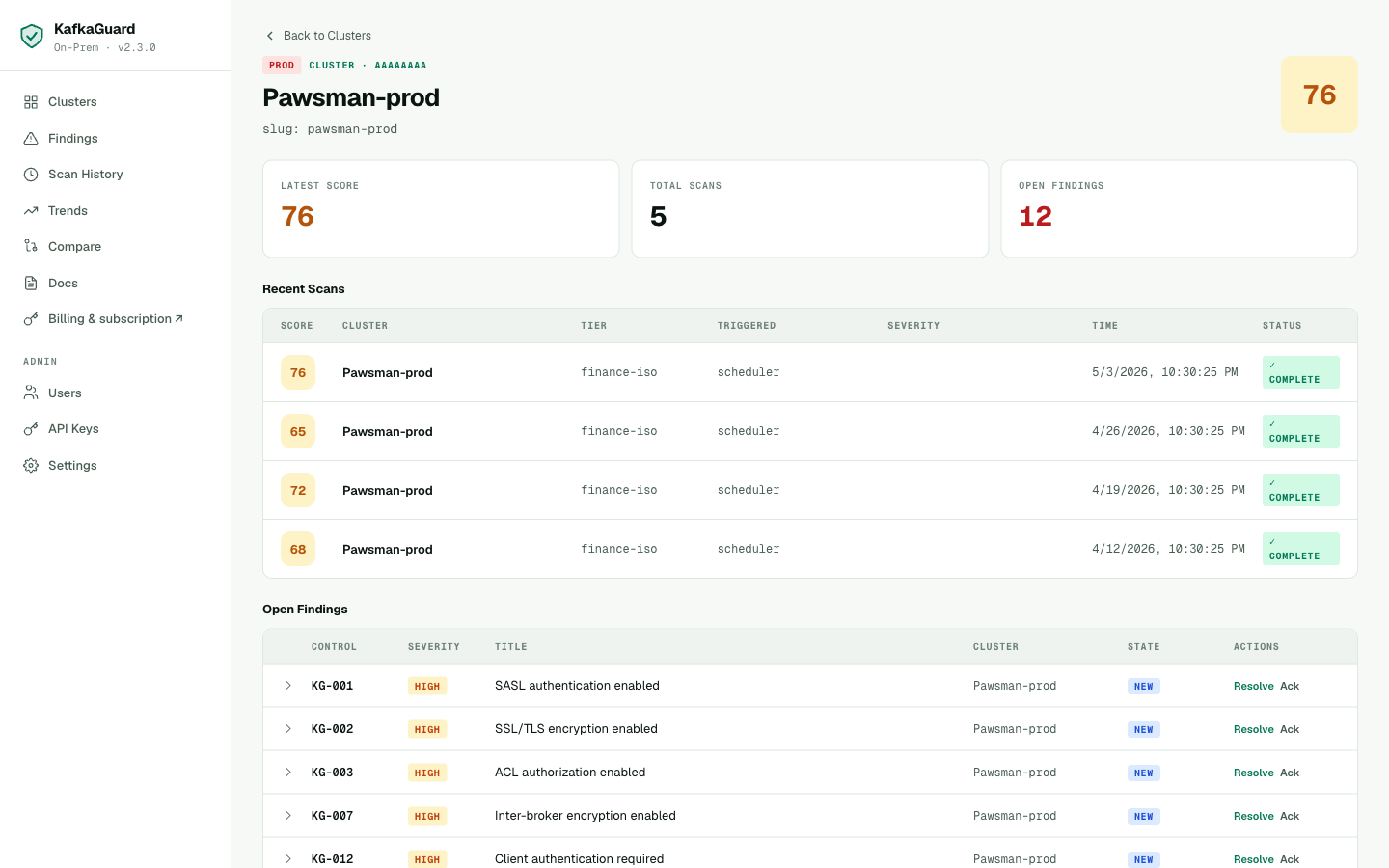
Interactive HTML report — expandable remediation per control, tabbed compliance framework mapping, severity filters, print-ready.
No server required. Open it directly in Chrome, Firefox, or Safari. The compliance mapping tabs (PCI-DSS / SOC 2 / ISO 27001) let auditors navigate directly to the controls relevant to their framework.
The PDF Report — Audit-Ready
open ./pawsman-compliance-may2026/scan-20260503-953cec2e.pdf
The PDF is designed to hand directly to an auditor. It includes:
- Cover page — cluster name, scan date, KafkaGuard version, policy used
- Executive summary — compliance score gauge, severity breakdown (16 HIGH, medium, low)
- Full control table — all 55 rows, pass/fail status, severity, remediation step
- Sign-off page — blank signature block for auditor sign-off
The scan detail view in the dashboard — drill into any scan to see severity breakdown, all findings, and download any report format.
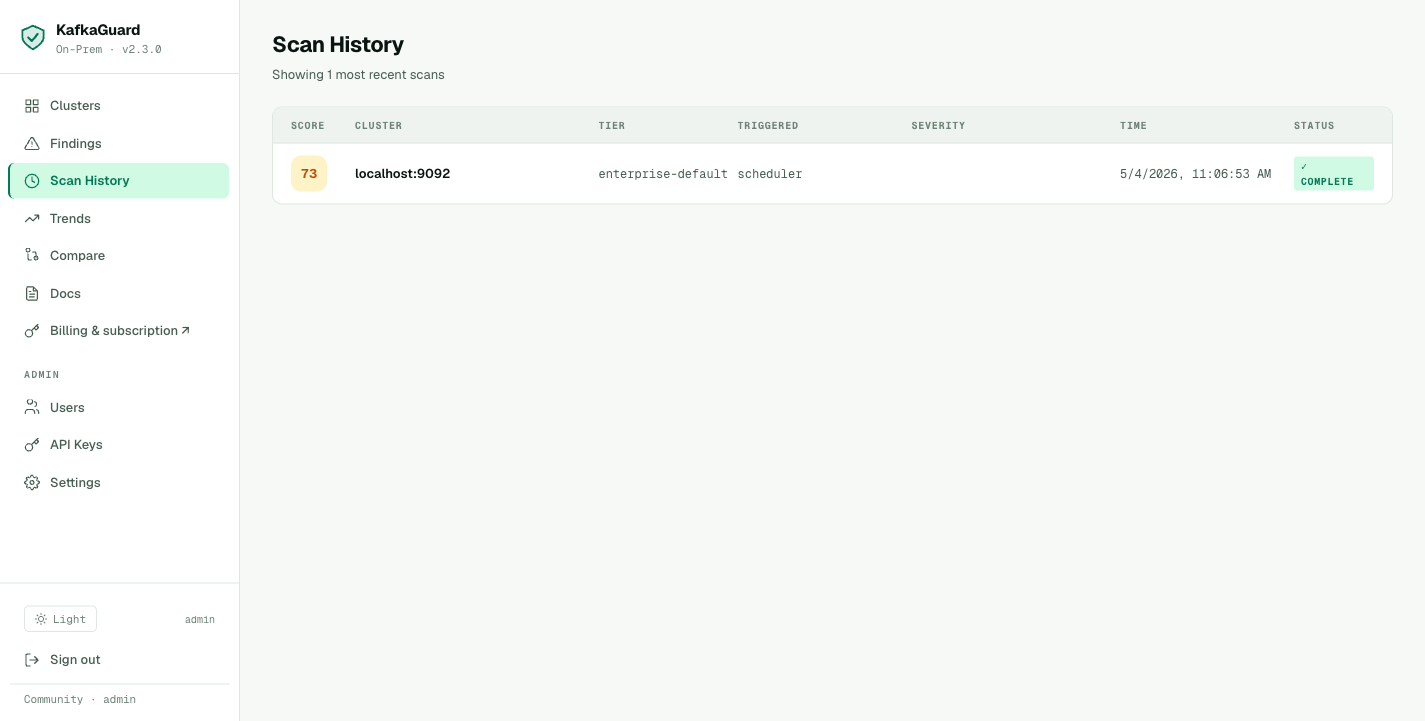
Scan history showing every run — score trend, policy used, and duration. Each row links to the full report.
The CSV Report — SIEM and Jira Integration
The CSV maps every finding to PCI-DSS, SOC 2, and ISO 27001 — pulled directly from the scan:
Control ID,Title,Status,Severity,Category,PCI-DSS,SOC2,ISO 27001
KG-001,SASL authentication enabled,fail,HIGH,security,"8.1, 8.2","CC6.1, CC6.2, CC9.2","A.9.2.1, A.9.2.2"
KG-002,SSL/TLS encryption enabled,fail,HIGH,security,4.1,"CC6.5, CC6.6","A.10.1.1, A.10.1.2, A.13.1.1"
KG-003,ACL authorization enabled,fail,HIGH,security,"7.1, 7.2","CC6.1, CC6.2, CC6.3","A.9.1.1, A.9.4.1"
KG-007,Inter-broker encryption enabled,fail,HIGH,security,4.1,"CC6.5, CC6.6","A.10.1.1, A.13.1.1"
KG-016,Replication factor ≥ 3,pass,HIGH,reliability,,,
...
Import directly into Jira, Linear, or ServiceNow:
# Create Jira tickets for all HIGH-severity failures
awk -F',' '$4=="HIGH" && $3=="fail"' scan.csv | \
  while IFS=, read -r id title status sev cat msg remedy pci soc2 iso; do
    jira issue create --type Task \
      --summary "KafkaGuard $id: $title" \
      --description "PCI-DSS: $pci | SOC 2: $soc2 | Remediation: $remedy"
  done
PCI-DSS 4.0 Compliance Map — Pawsman's Current Status
Pawsman processes card payments. PCI-DSS 4.0 applies. Here's how their Kafka cluster maps to the requirements the auditor will ask about:
| PCI-DSS Req | Description | KafkaGuard Controls | Pawsman Status |
|---|---|---|---|
| 2.2.1 | System components configured securely | KG-028, KG-030, KG-034 | ❌ 2/3 fail |
| 4.1 | Cryptography for PAN in transit | KG-002, KG-007 | ❌ Both fail |
| 7.1 | Access control to system components | KG-003, KG-047 | ❌ Both fail |
| 8.1 | User identification and authentication | KG-001, KG-012 | ❌ Both fail |
| 8.2 | Authentication factor management | KG-001 | ❌ Fail |
| 10.1 | Audit logs for all components | KG-041 | ❌ Fail |
| 10.2 | Audit log retention ≥ 90 days | KG-042 | ❌ Fail |
PCI-DSS score: 3/8 requirements fully covered. The five failing requirements are all critical for a payment processor. A PCI QSA auditor would flag these as immediate remediation required.
SOC 2 Type II — CC Series Mapping
SOC 2 Common Criteria that map to Kafka security:
| CC Control | Description | Status |
|---|---|---|
| CC6.1 | Logical access controls | ❌ KG-001, KG-003 fail |
| CC6.2 | Prior to issuing credentials | ❌ KG-001 fails |
| CC6.3 | Restriction of access based on need | ❌ KG-003 fails |
| CC6.5 | Transmission of data using encryption | ❌ KG-002, KG-007 fail |
| CC6.6 | Authentication before access | ❌ KG-001, KG-012 fail |
| CC7.2 | System monitoring | ❌ KG-041 fails |
| CC8.1 | Change management | ✅ KG-023 passes |
| CC9.1 | Risk assessment | ❌ KG-002 fails |
What Comes Next — The Remediation Plan
Based on the scan, Pawsman's engineering team builds a 4-week remediation plan:
Week 1 — Authentication foundation
- Enable SASL/SCRAM-SHA-512 on all brokers (rolling restart)
- Generate TLS certificates (internal CA via cfssl)
- Configure SSL on all listeners
Week 2 — Authorization
- Enable
StandardAuthorizer(KRaft-compatible) - Create service accounts for each application
- Apply least-privilege ACLs per topic
Week 3 — Compliance gaps
- Enable audit logging
- Extend log retention to 90+ days
- Configure JMX authentication
- Enable encryption at rest (OS-level LUKS)
Week 4 — Validation
- Re-run KafkaGuard finance-iso scan
- Generate final PDF report for auditors
- Review with security team
In Part 3, we'll show the dashboard, set up continuous monitoring with Slack alerts, and walk through the license activation steps.
Current Findings Explorer
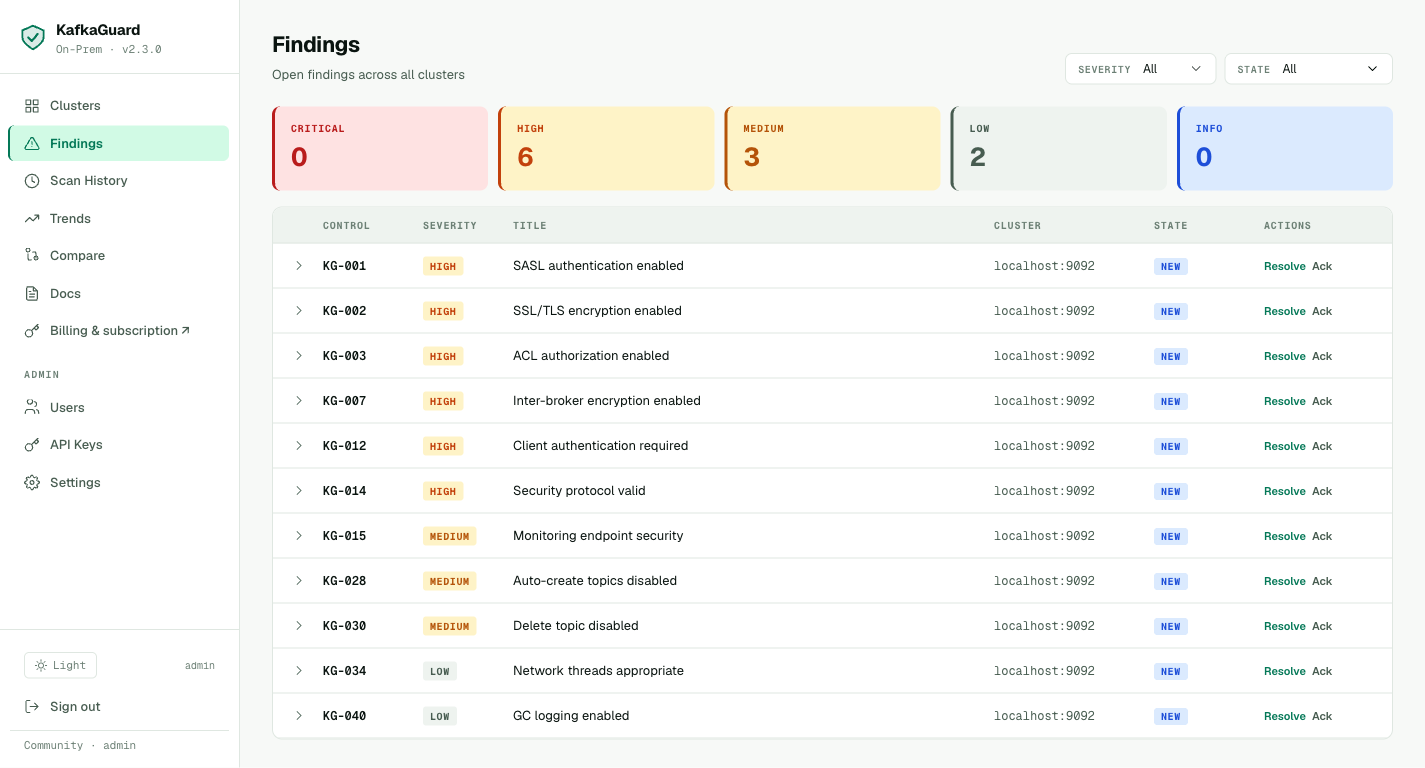
Every failing control is tracked in the dashboard findings explorer — filter by severity, acknowledge issues you're aware of, and track remediation progress.
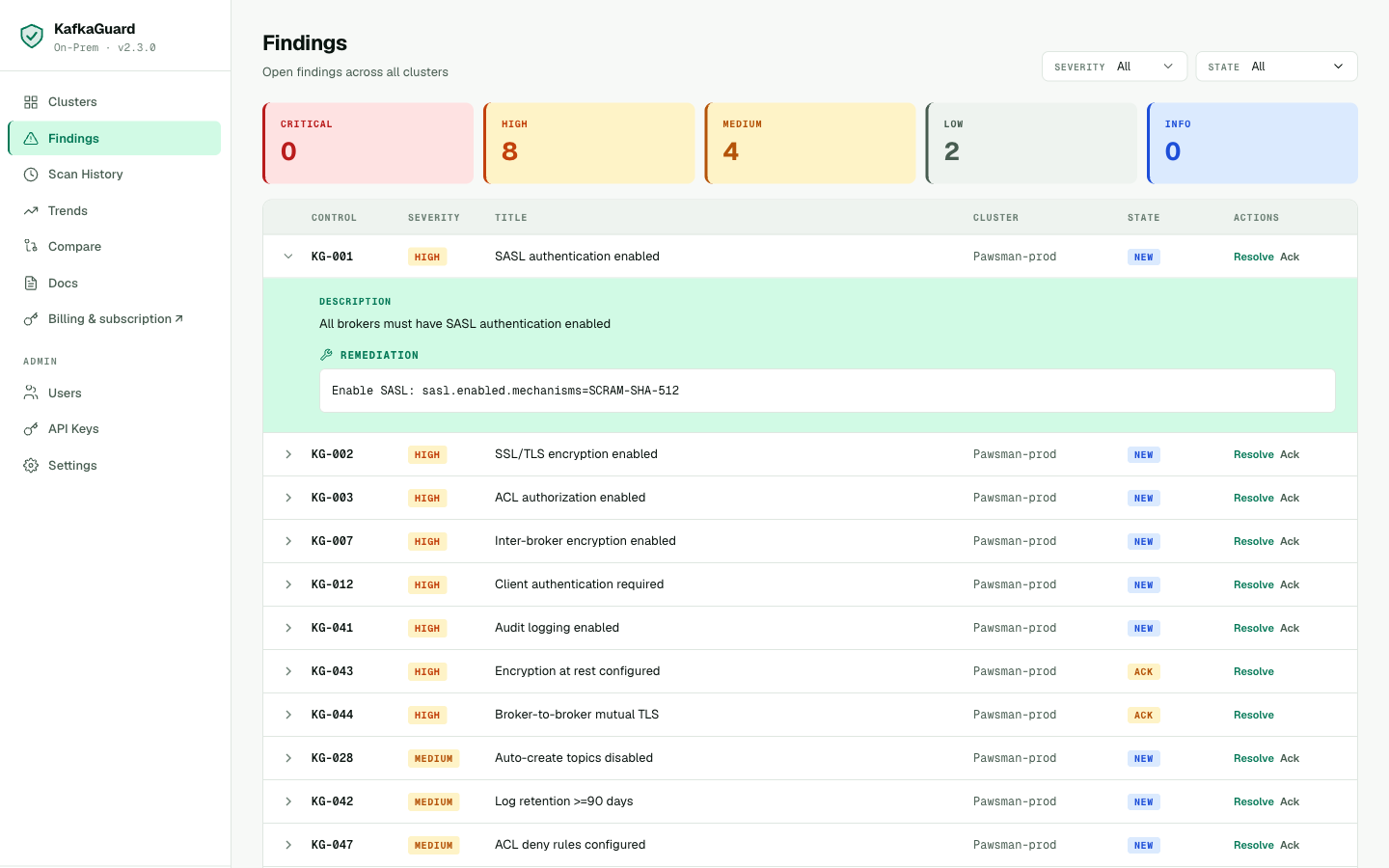
Expand any finding to see the full description, affected brokers, and step-by-step remediation guidance.
Try It on Your Cluster
The full finance-iso scan (all 55 controls, PDF report, compliance mapping) is included in the free Community tier. No license key required.
# Download the on-prem bundle (CLI + compose + policies included)
curl -LO https://github.com/KafkaGuard/kafkaguard-releases/releases/download/v2.3.0/kafkaguard-onprem-v2.3.0-Darwin_arm64.tar.gz
tar -xzf kafkaguard-onprem-v2.3.0-Darwin_arm64.tar.gz
cd kafkaguard-onprem-v2.3.0/
sudo mv kafkaguard /usr/local/bin/

# Run the full compliance audit
kafkaguard scan \
  --bootstrap your-kafka:9092 \
  --policy policies/finance-iso.yaml \
  --format json,html,pdf,csv \
  --out ./compliance-audit
→ Continue to Part 3: Dashboard, Monitoring, and License Activation